|
PDFill PDF Editor
Versions
Looking for an inexpensive alternative to Adobe Acrobat?
Please try PDFill! You can use the
Free PDF
Writer to create free PDF or Image from any printable
application. You can use the
Free PDF
Tools to merge, split, reorder, delete, encrypt,
decrypt, rotate, crop and reformat PDF pages, add
information/header/footer/watermark, convert image to PDF or
PDF to image, scan a Paper to PDF, and more. You
can use the FREE PDF Editor
to fill the form, type text, comment, create form, and more. Besides, with a fraction of the cost of Adobe Acrobat,
PDFill PDF Editor can do more than the Free Adobe Reader.
There are 3 versions of
PDFill. Please see the
Version Comparison.
1.
Free
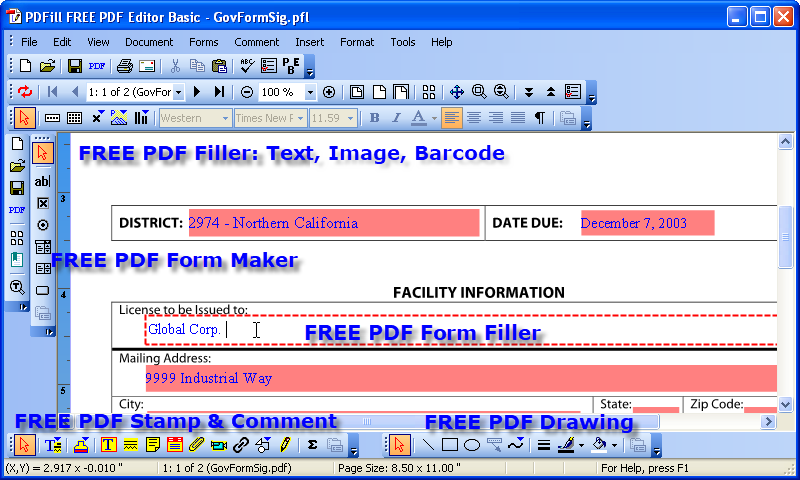
Basic Version:
2. Professional Version:

3.
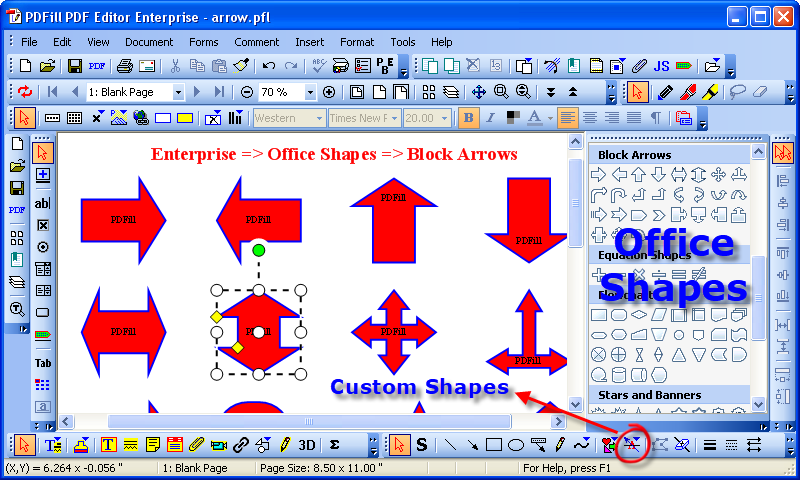
Enterprise Version:
Unique features:
Office
Shapes, Custom
Shapes,
Fill Mode
|
-
Save
All Editing back to the Original PDF
Save the filled PDF locally with
options to add
Output Options,
Description,
Encrypt/Decrypt,
Initial View,
Presentation Effect
and
Advanced. Save editing now with project file and
Resume editing later.
-
PDF Redaction & PDF Eraser
Redact or remove the original sensitive
content (Text, Image, Shapes,
Comment and Form Fields).
-
Edit the
Original Text:
Delete/Replace the original text with
the New SingleLine Text.
Edit the Original Image: Delete/Replace the original Image.
Edit
the original Form Field:
Delete/Edit the current form field or
the entire form fields.
Edit
the original Comment:
Delete/Edit the current comment or
the entire comment.
-
Group
and Ungroup & Lock and Unlock Objects
Group
texts, shapes or pictures into a
complicated object. Lock the object from
editing.
-
Save, Manage and Use the PDFill Objects
Save the PDFill Object and
use it later easily
-
PDF Document
Management
Insert
New Blank PDF,
Delete/Renumber Pages,
Insert PDF Pages
with Interleave Options,
Extract PDF Pages,
Replace PDF Pages,
Add Page
Rotation/Crop/Action, Add
Bookmark, Add
Header and
Footer, Add Watermark by
Text/Image/PDF
Page,
Attach A
File, Add
JavaScript for
Document, Add a
Digital Signature, Add
Bates Numbering,
PDF Optimizer,
Extract Text
and
Image,
and
OCR.
Deskew
Document to rotate, move and scale
page like image.
-
PDF Form
Maker
Create
SAVABLE PDF
Form Fields (Text Field,
Check Box,
Radio Button,
Combo Box,
List Box,
Push Button
or
Digital Signature)
with
Action
(Reset & Submit),
Keystroke,
Format,
Validate
and
Calculate. Tools for
Form Field Recognition,
Multiple
Copying,
Tab Order,
Calculation Order
and
Alignment.
The PDF form by PDFill can be saved or
submitted by
Adobe Reader XI.
-
PDF
Ink Annotator
Write, draw, mark or
highlight PDF documents on PC with mouse or
on Tablet PC using the pen input.
-
PDF Form Filler
Fill-in and save interactive PDF forms
to your computer for easy archiving,
E-mailing or later printing.
Allows you to
Fill,
Edit
or
Delete PDF fields. You can also
Import
or Export
form data into Text and
Excel file.
AutoFill,
Batch
Command and
Spell Checker
Tools are
for the filling convenience.
-
PDF Filler & PDF
Typewriter
Insert new formatted
Single
Line or
Multiple
Line Text,
Check,
Image,
Hyperlink,
Whiteout,
or
Highlight.
Overlay PDF Page
like an image.
-
PDF Stamp, PDF Comment or
PDF Markup
Select Original Text to Highlight,
Strikethrough, Underline, Squiggly and Note.
Insert
Stamp,
Text Box,
Highlight,
Sticky Note,
Popup,
File Attachment,
Play Video,
Link,
Line,
Arrow,
Rectangle,
Circle,
Polyline,
Polygon,
Cloud,
Pencil,
or
PDF 3D
directly onto the PDF document.
-
PDF Drawing
Add
Line,
Arrow,
Rectangle,
Circle,
Ellipse, Arc, Pie,
Basic Shapes and
Curves with border/filling
styles directly into the PDF document.
You can draw your signature into PDF.
-
PDF Barcode
Add
QR Code,
Data Matrix and
PDF 417,
POSTNET/PLANET,
CODABAR,
Code 39,
Interleaved 2 of 5,
EAN/UPC,
Code 128
-
PDF Scanner
Scan your Paper
Form or Photo directly into a new or existing PDF
document, then you can fill it using computer!
-
PDF
Link & PDF Action
Add PDF
Actions:
Web Link, PDF Form
Reset
&
Submit,
JavaScript, Page
Navigation,
Goto
Local Page, Goto
another PDF document,
and launching
external application with
triggers: Mouse Up/Down/Enter/Exit, On
Focus/Blur.
-
PDF Layer
Add PDF Layer to allow the added
PDFill objects visible or invisible in the PDF
Document.
-
Support for International languages
Type your
language into PDF just like if you were
using a typewriter. See
PDF Filler.
Create a PDF Form Field to fill
International languages. See
PDF Form
Maker.
Add your comment in your language as
Free Text, Sticky Notes or Popup. See
PDF
Comment.
-
Align Tools,
Copy Tools
and Smart Positioning to
rearrange, resize, or move the filling PDF
Objects to give the PDF page a cleaner, more professional look.
-
Batch Commands
to Export or Import of PDF Form
Data/Bookmark/Metadata, Merge, Split,
Extract, Encrypt, Decrypt, Rotate,
Crop, Reformat, Header or Footer, Watermark
by Text, Watermark by Image, Convert Images
to PDF, Convert PDF into Images, Barcode,
Optimizer, Extract Text/Image and OCR
-
Thumbnail View
to select or unselect PDF pages; Rearrange pages by drag and drop;
Move, delete, extract and
replace the selected pages; Insert a blank page or new PDF pages.
-
PDFill
Options,
Menu Bars,
Right-Click Menus and
Toolbars to
provide flexibility in PDF editing.
-
FREE PDF
Editor Basic allows you to
fill the form, insert text/image/comment/barcode, create
basic form, make simple drawing, and more.
-
FREE PDF
& Image Writer
allows you to create
PDF
or
Image from ANY printable windows application
including Microsoftı Word, PowerPoint, Excel, Cad, and More.
-
Free PDF Tools
allows you to Merge, Split and Reorder, Encrypt and Decrypt, Rotate and Crop,
Reformat, Header and Footer, Watermark by text, Watermark by image, Convert
images to PDF, Convert PDF to image, Flatten/Delete/List PDF Form Fields,
Convert Postscript to PDF, Add PDF
Information, Scan to PDF, and Create
Transparent Image.
|
